In today’s competitive recruiting landscape, a well-crafted sports highlight video can make the difference between being overlooked and standing out. For athletes aiming to play at the next level, highlight reels have become non-negotiable. But here’s the question many parents and athletes ask: what’s the best software to make a sports highlight video that actually looks professional?
The truth is, software alone won’t make or break your video — editing expertise and recruiting knowledge matter just as much. Here are the tools worth knowing about in 2026, including where AI-powered options now beat what used to require hours of manual editing.
Why Software Choice Matters
A great sports highlight video requires:
- Clean editing tools to trim and organize clips quickly
- Player identification tools — arrows, spotlights, or text to identify your athlete in every clip
- Flexible export and sharing — HD exports, one link for every coach, no re-uploading per platform
- Update flexibility — recruiting is ongoing, so you’ll need to add new footage often, not just once
Without the right software, videos can look unprofessional or fail to showcase the athlete clearly — which can make a real difference in recruiting outcomes.
Top Software Options for 2026
1. SportsReelz Player Platform
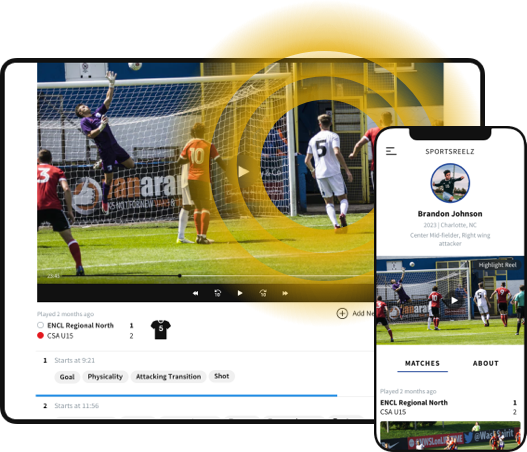
Unlike the general-purpose editors below, SportsReelz’s Player Platform is built specifically for recruiting video — with AI-powered tagging that identifies and organizes your athlete’s best plays automatically, instead of scrubbing through hours of footage by hand.
✅ Pros: AI-powered highlight tagging, import footage from any platform (Hudl, YouTube, Dropbox, and more), one shareable link for every coach, own your video for life instead of losing it when you leave a team account, 14-day free trial.
❌ Cons: Built specifically for recruiting video — if you want a general-purpose editor for non-sports projects too, it’s not that.
💡 Best for: Families who want professional-quality results without a steep learning curve — and who’d rather not start from scratch if plans change or a team account goes away.
2. Hudl
Hudl remains one of the most widely used platforms in team sports, and a common starting point for raw footage.
✅ Pros: Seamless access to team game film, easy clip tagging, direct sharing with coaches.
❌ Cons: Editing tools are limited, and footage is generally locked to what your team uploads — if you leave the team or the program changes tools, you can lose access to your own film.
💡 Best for: A starting point for raw game film — many families combine Hudl footage with a dedicated recruiting-video tool for the actual edit.
3. iMovie (Mac/iOS)
One of the best free options for Apple users, with simple drag-and-drop editing.
✅ Pros: Free, easy to learn, good for basic trimming.
❌ Cons: No sports-specific tools like arrows, spotlights, or player-ID overlays.
💡 Best for: Parents who want to do quick, simple cuts on Apple devices before polishing elsewhere.
4. Adobe Premiere Pro
The industry standard for professional editing, offering nearly unlimited customization.
✅ Pros: Professional-grade editing, full creative control.
❌ Cons: Expensive subscription, steep learning curve — this is the software our own editors use behind the scenes, so DIY families should expect real time investment to get comparable results.
💡 Best for: Parents or athletes already comfortable with professional editing software.
5. Final Cut Pro (Mac)
Another professional-grade option for Apple users, with a smoother learning curve than Premiere.
✅ Pros: High performance, one-time purchase instead of a subscription.
❌ Cons: Mac-only, high upfront cost.
💡 Best for: Mac families who want professional results and don’t want an ongoing subscription.
Common DIY Mistakes
Even with the best software, DIY highlight videos fall short for the same handful of reasons:
- Videos that run too long (over 5-6 minutes)
- Forgetting to identify the athlete clearly in each clip
- Overusing music or flashy transitions instead of letting the footage speak
- Including average plays instead of only the best ones
These mistakes are exactly why coaches stop watching in the first 30 seconds — the single most avoidable way to lose a recruiter’s attention.
DIY or Done-For-You — Your Call
The best software to make a sports highlight video in 2026 ranges from free tools like iMovie to AI-powered platforms built specifically for recruiting. Software alone won’t guarantee results — how clips are selected, structured, and presented still matters most.
That’s why SportsReelz gives you both paths: build it yourself with AI-powered tagging, or let our sport-specific pros build it for you in 2–3 weeks. Either way, your athlete owns the finished video for life — not locked to a team account that can disappear. If you would rather skip the learning curve entirely, our professional highlight video service can build it for you — learn more here.
Frequently Asked Questions
What’s the best software to make a sports highlight video?
It depends on your needs — AI-powered platforms built for recruiting (like SportsReelz's Player Platform) save the most time, while general editors like Premiere give more manual control.
Do I need expensive software to make a good highlight video?
No — free tools like iMovie can work for basic edits, though sports-specific platforms add player-ID tools and AI tagging that general editors don't have.
Is a phone editing app good enough for a recruiting video?
For quick social clips, yes — but for a full recruiting video, a more structured tool built for player identification and pacing tends to perform better.