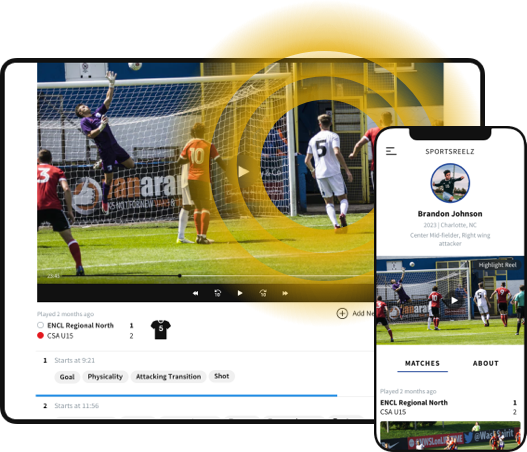
For parents of aspiring athletes, the recruiting process can feel overwhelming. Between travel tournaments, training schedules, and academics, finding the right way to showcase your child’s athletic talent is no small task. One of the most effective tools in this process is a sports highlight video — a digital resume college coaches use to quickly evaluate an athlete’s potential.
While professional services like Sports Reelz specialize in creating polished, recruiter-ready videos, many parents also explore do-it-yourself software options to get started. With so many platforms available in 2025, knowing which ones are worth your time and money is essential.
This guide breaks down the best software options, what features matter most, and how parents can make the smartest choice for their athlete’s recruiting journey.
Why Software Choice Matters
Not all editing tools are created equal. A great sports highlight video requires:
- Clean editing tools to trim and organize clips quickly.
- Features for arrows, circles, or spot shadows to identify players.
- Flexible export options for YouTube, Sports Reelz, Twitter, Instagram or direct coach emails.
- Ease of use for parents who may not have a background in editing.
Without the right software, videos can look unprofessional or fail to showcase the athlete clearly — which can make a big difference in recruiting outcomes.
Read More: Top 5 Best Software to Make Sports Highlight Videos Like the Pros
Top Software Options for 2025
1. Sports Reelz
Sports Reelz isn’t just another video editor — it’s a platform built around what recruiters actually want to see. Parents and athletes can upload footage from any source, and export highlight reels in multiple formats for easy sharing.
Pros:
- Accepts imports from any platform (not limited to team film).
- Easy link sharing, Download/export to social media playlists and Organisation.
- Professional tools for player ID (arrows, spot shadows, play categories).
- Recruiter-approved templates and structure.
- Option to update highlights throughout the season.
💡 Best For: Families who want professional polish and flexibility without the learning curve.
Hudl
Hudl remains one of the most widely used platforms in team sports. It’s great for accessing team footage, but editing flexibility is limited.
Pros:
- Built-in with team film systems.
- Easy clip tagging and sharing with coaches.
Cons:
- Restricted to team-uploaded footage (no outside imports).
- Can’t download, No professional support.
- Fewer advanced editing features.
💡 Best For: Team coaches and athletes already using Hudl regularly.
iMovie (Mac/iOS)
Perfect for beginners, iMovie provides simple drag-and-drop tools and clean output.
Pros:
- Free for Apple users.
- Intuitive and quick to learn.
Cons:
- Lacks sports-specific tools like arrows or player highlights.
- Need fast computer, have to manage video files on device.
💡 Best For: Parents who want to do quick, simple edits on Apple devices.
4. Adobe Premiere Pro
For those who want complete creative control, Premiere Pro offers professional-grade editing capabilities.
Pros:
- Fully customizable edits, effects, and transitions.
- Used by professional editors worldwide.
Cons:
- Steep learning curve and subscription-based model.
💡 Best For: Parents with prior editing experience or those willing to invest time learning.
CapCut & Other Mobile Apps
Mobile-friendly editors like CapCut make it easy to create quick clips from your phone.
Pros:
- Free or low cost.
- Great for fast, simple highlight cuts.
Cons:
- Limited precision and professional tools.
- Very time consuming, usually looks unprofessional, Hard to manage files.
💡 Best For: Quick social media highlight reels.
What to Look For in Highlight Video Software
When deciding which platform to use, focus on these essentials:
- Ease of Use: Can you organize clips efficiently without prior experience?
- Player ID Tools: Arrows, spotlights, and overlays that help coaches identify your athlete.
- Flexible Exporting: Ability to export in HD and share easily.
- Cloud Access: Storage options for quick updates and sharing links.
Common Mistakes Parents Make
Even with great tools, DIY videos can fall short if:
- They show incorrect plays, don’t capture coaches’ attention.
- They use distracting effects or music.
- The athlete isn’t clearly labeled in each clip.
- They focus on quantity instead of standout moments.
This is why many families turn to Sports Reelz, where expert editors understand exactly what recruiters look for.
Why Sports Reelz Is the Smartest Choice
Software alone can’t replace editing strategy. At Sports Reelz, our team combines recruiting insight with professional production to ensure your athlete’s video stands out.
- Select the most impactful clips.
- Add clean, professional identifiers.
- Maintain ideal video length and pacing.
- Keep highlights up-to-date throughout the season.
Parents who begin with DIY tools can still elevate their results by pairing them with Sports Reelz’s professional touch — ensuring every reel is recruiter-ready.
🚀 Final Takeaway
In 2025, parents have more options than ever to create standout sports highlight videos. Whether you start with iMovie or Premiere, or dive straight into Sports Reelz, the key is clarity, structure, and quality.
DIY software can help you get started — but Sports Reelz ensures your athlete’s video makes the strongest impression possible on college coaches. If you’re ready to give your athlete a competitive edge in recruiting, contact Sports Reelz today.