
A Parent's Guide
Best Video Editing Software for Sports Highlights: A Parent’s Guide
You don't need to be a video editor to build a recruiting video that works. Here's a parent-friendly breakdown of your editing options — DIY, software, or letting a pro handle it.
For parents of aspiring athletes, the college recruiting journey can feel like uncharted territory. Between travel teams, tournaments, and academics, finding time to put together a professional sports highlight video often seems overwhelming. Yet highlight videos are among the most powerful tools for helping athletes stand out to recruiters.
The challenge? Deciding whether to create a video yourself using online tools like ours—or to partner with professionals like Sports Reelz—and, if going the DIY route, figuring out what editing software to use.
This guide walks parents through the best video editing options available in 2025, highlighting their strengths, limitations, and how they fit into the recruiting process.
Why Video Editing Software Matters in Recruiting
A highlight reel is more than just a montage of game clips. It needs to:
- Showcase position-specific skills.
- Clearly identify the athlete in each play.
- Be short, professional, and easy for coaches to evaluate.
- Spotlight multiple skills in each play, Plays transferable to the next level.
Good editing software makes this process simple—providing tools to trim footage, add arrows or spotlights, and export in recruiter-friendly formats like YouTube or email. Without the right tools, highlight videos can look amateurish, which may actually hurt an athlete’s chances.
Read More: Top 5 Best Software to Make Sports Highlight Videos Like the Pros
Top Video Editing Platforms for Sports Highlights (2025)
Sports Reelz
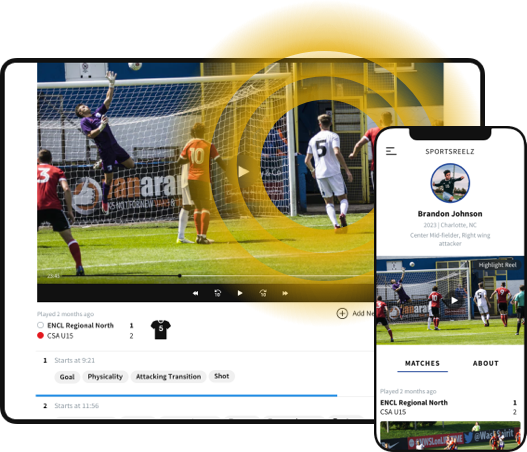
Sports Reelz is built specifically for athletes and families navigating the recruiting process. Unlike generic editors, it combines professional editing tools with one-on-one expert support to ensure every video meets recruiter expectations. Explore the full Sports Reelz highlight software to see exactly how the editing and tagging tools work before you commit to a DIY approach.
Pros:
- Professional editing support and guidance from start to finish.
- Ability to import video from any platform (Hudl, YouTube, Dropbox, etc.).
- Easy reordering of plays and creation of multiple playlists.
- Download-ready videos for use on other platforms.
- Highlight tools (arrows, spotlights) built for recruiters.
Cons:
- Not a full team management platform — designed specifically for athlete recruiting success.
Hudl/VEO
Hudl remains popular among teams for sharing game footage, but it’s not designed for individualized recruiting videos.
Pros:
- Integrated with team film; easy sharing if your footage is already there.
Cons:
- Limited customization and no personalized support.
- You must already have your team video uploaded to Hudl.
- Lacks flexibility to pull in video from other platforms.
Hudl works well for team film—but when it comes to standout recruiting videos, Sports Reelz provides the personalized polish recruiters actually look for.
iMovie (Mac/iOS)
A simple, beginner-friendly editor that’s free for Apple users.
Pros:
- Very easy to learn and use.
- Great for trimming clips and basic edits.
Cons:
- Lacks sports-specific features like player spotlights and on-screen identifiers.
Adobe Premiere Pro & Final Cut Pro
These are professional-grade editors often used in film production. They offer robust capabilities but come with steep learning curves.
Pros:
- Advanced tools for transitions, graphics, and precision edits.
- Excellent video quality output.
Cons:
- Complex for beginners.
- Expensive (subscription or one-time purchase).
- Time-consuming compared to sports-focused tools like Sports Reelz.
CapCut & Other Mobile Apps
For quick social media clips, CapCut and similar apps are fast and convenient—but not ideal for formal recruiting videos.
Pros:
- Free or low-cost.
- Easy to create short reels for social platforms.
Cons:
- Limited precision for professional recruiting.
- Better suited for TikTok or Instagram than college coaches.
Key Features Parents Should Look For
When evaluating highlight video tools, look for:
- Ease of Use: Quick setup and simple editing.
- Spotlight Tools: Arrows, circles, or effects that make your athlete stand out.
- Flexibility: Ability to import video from multiple sources.
- Professional Support: Access to editing experts when needed.
- Multiple Playlists & Easy Updates: As your athlete progresses, you’ll want to refresh their highlights.
- Download Options: Export your reel for YouTube, email, or recruiting platforms.
Common DIY Mistakes
Even with good software, parents often stumble with:
- Choosing flashy plays over impactful plays, showing recruiters the wrong play.
- Including average plays instead of the best moments.
- Forgetting to spotlight the athlete.
- Using distracting music or effects.
These are exactly the issues Sports Reelz helps families avoid—so every second of your athlete’s reel counts.
Why Sports Reelz Is the Right Choice
Software gives you tools. Sports Reelz gives you a recruiting strategy.
With Sports Reelz, families get:
- Expert help selecting and sequencing plays for maximum impact.
- Professional identifiers (arrows, highlights, text overlays).
- Easy reordering and multiple playlists.
- The ability to import from any video source—not just team platforms.
- Downloadable, recruiter-ready video files.
- Ongoing professional support for updates and revisions.
Sports Reelz isn’t just editing software—it’s a recruiting partner dedicated to making your athlete shine.
Final Takeaway
The best video editing platforms in 2025 range from beginner-friendly tools like iMovie to full professional suites like Premiere Pro. But for parents focused on recruiting results, the clear choice is Sports Reelz—a platform designed specifically to make athletes stand out. Ready to turn your athlete’s raw footage into a recruiter-ready highlight reel?
👉 Contact Sports Reelz today to get started and create a video that truly gets noticed.
Frequently Asked Questions
Do parents need video editing experience to build a recruiting video?
No — there are DIY tools built specifically for this that don't require any editing background, plus the option to hand it off entirely.
What should parents look for in editing software?
Ease of use, player-identification tools, and flexible sharing — not necessarily the most advanced features.
Is it better to DIY or hire it out?
Depends on time and comfort level — both are legitimate paths, and the right one is whichever gets a quality video actually finished and sent to coaches.